🍳 Induction Hob
The induction hob heats quickly and includes an integrated extractor fan.
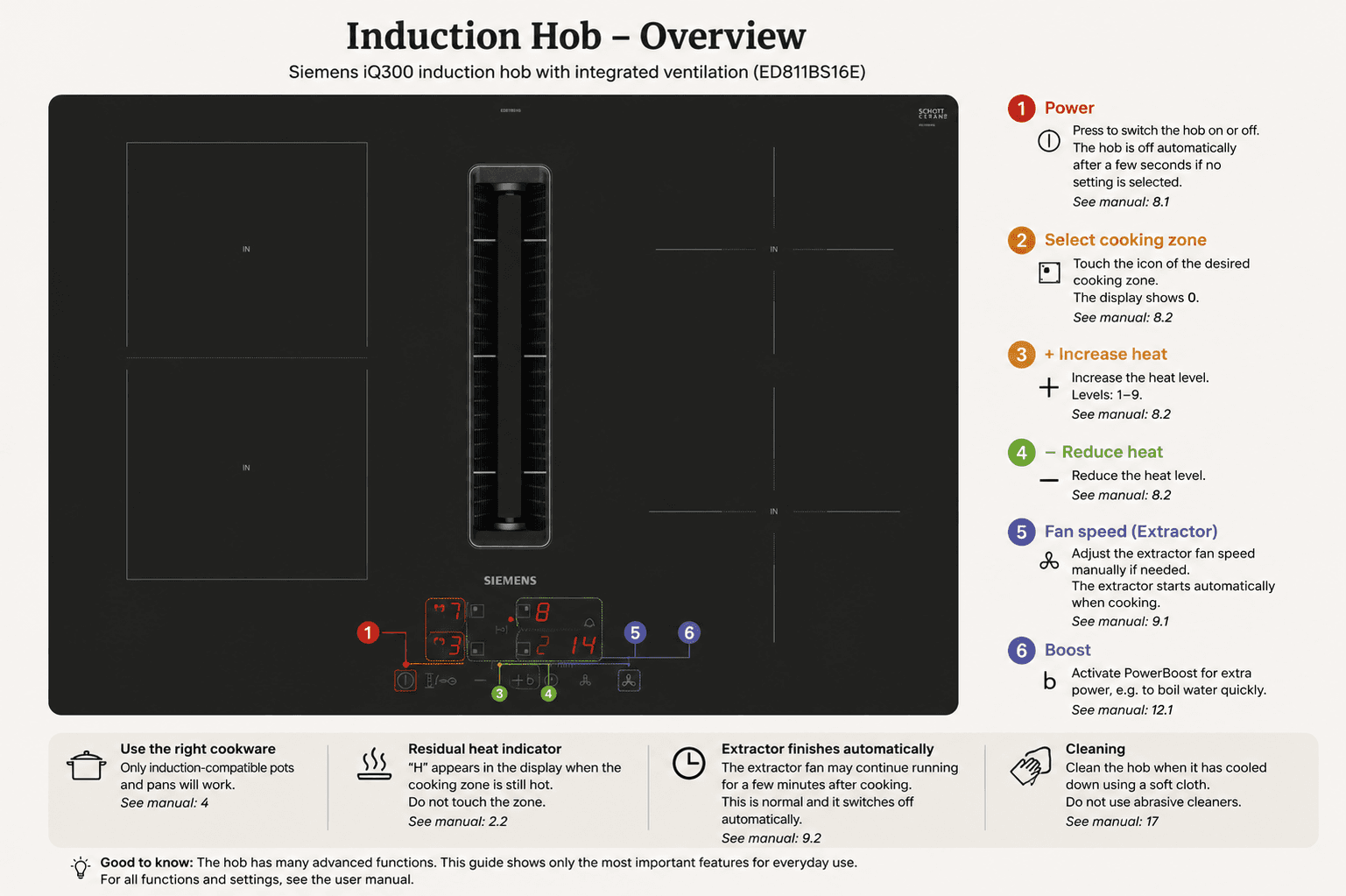
Use the overview below to identify the power button, cooking-zone controls, heat settings, extractor fan and PowerBoost function.
🔥 Important Safety Information 🔥
- Never leave cooking unattended.
- Use induction-compatible cookware only.
- Do not touch a cooking zone while the residual heat indicator is showing.
- Never place paper, plastic, cloth, cutlery or other objects on the hob.
- Keep the control panel clean and dry.
🍽️ Before cooking
Use suitable cookware
Only induction-compatible pots and pans will work. The bottom should be flat, clean and dry.
Place the pan on a cooking zone
Place the pan in the centre of the desired cooking zone before switching on the hob.
Turn the hob on
Press the Power button marked 1 in the overview above.
👨🍳 Cooking
Select the cooking zone
Touch the control for the desired cooking zone, marked 2 in the overview.
Adjust the heat
Use + and −, marked 3 and 4, to select the heat level.
Suggested heat levels
- 1–3
- Keep warm or simmer
- 4–6
- Everyday cooking
- 7–9
- Frying or boiling
- Boost
- Boil a large amount of water quickly
Use the extractor fan
The extractor normally starts automatically when cooking begins. Use the fan control marked 5 to adjust it manually when needed.
Use PowerBoost when needed
Select a cooking zone and press the control marked 6 for extra power. Use it mainly for quickly boiling water.
✅ When you're done
Turn the hob off
Press the Power button marked 1.
Let the extractor finish
The extractor may continue running after cooking. This is normal and it will switch off automatically.
Wait for the hob to cool
Do not touch or clean a cooking zone while the residual heat indicator is showing.
Wipe the surface
When the hob is cool, clean it with a soft damp cloth. Do not use abrasive cleaners, oven cleaner, steel wool or rough sponges.